


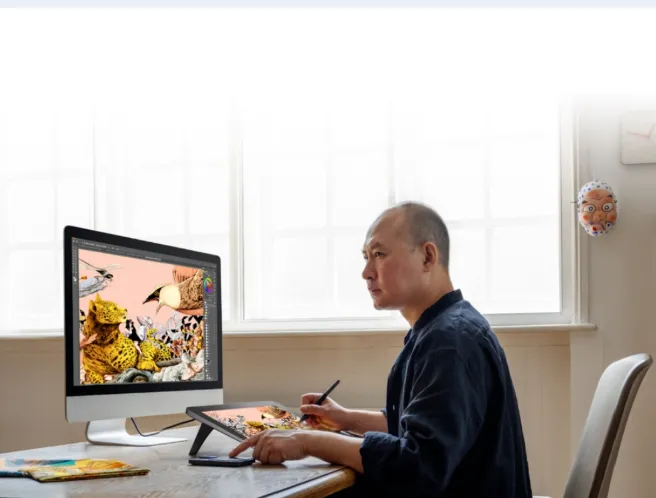
As digital art becomes increasingly popular, many beginners find themselves stuck on a common question: What is the difference between a tablet and a drawing tablet? At first glance, the two devices may look similar, but their functions, capabilities, and intended audiences are completely different. Whether you’re an aspiring illustrator, a hobbyist, or someone exploring creative tools for work or school, understanding tablet vs drawing tablet is the first step to choosing the right device.
This guide breaks down the differences, explains how each device works, and helps you decide which one fits your needs. We’ll also look at a recommended XPPen drawing tablet ideal for both beginners and more serious artists.
1. What Is a Tablet?
A tablet is a general-purpose mobile device designed for everyday use. Think of it as a bigger version of a smartphone. Popular examples include the iPad, Samsung Galaxy Tab, and Lenovo tablets.
Key Characteristics of a Regular Tablet:
- Runs mobile apps: Browsing, streaming, gaming, note-taking, editing, and more
- Touchscreen-based: You operate it with fingers or a capacitive stylus
- Portable & lightweight: Convenient for travel, school, and work
- Standalone device: Does not need to connect to a computer
- Entertainment friendly: Ideal for movies, reading, social media, and casual drawing
Regular tablets can run drawing apps like Procreate, Clip Studio Paint, and Sketchbook, which makes them popular among casual artists. However, they have limitations, especially for detailed digital art that requires precision.
2. What Is a Drawing Tablet?
A drawing tablet, sometimes called a pen tablet or graphics tablet, is built specifically for digital art and design work. Instead of using your finger, you draw with a pressure-sensitive stylus that gives you control similar to traditional pencils or brushes.
There are three major types:
1. Graphics Tablets (Pen Tablets)
- No screen
- You draw on the tablet surface while looking at your computer screen
- Affordable and lightweight
- Great for beginners
2. Pen Display Tablets
- Have a built-in drawing screen
- You draw directly on the display
- Offer a more natural drawing experience
- Preferred by professional illustrators, animators, and designers
3. Standalone Drawing Tablets
- Built for drawing but functions without a computer
- Work like a tablet + drawing display combined
- Newer category, ideal for mobile digital artists
Brands like XPPen, Wacom, and Huion specialize in drawing tablets, and their devices focus on pen accuracy, screen texture, pressure sensitivity, and ergonomic design.
3. Tablet vs Drawing Tablet: What’s the Real Difference?
The phrase tablet vs drawing tablet comes down to one core distinction:
A regular tablet is made for general use, while a drawing tablet is designed specifically for digital art.
Here’s how they differ in practice:
1. Purpose and Use Cases
- Tablet: Entertainment, browsing, mobile apps, light drawing
- Drawing Tablet: Professional digital art, animation, graphic design, illustration
If your main focus is serious drawing or design, a drawing tablet is built for that purpose.
2. Stylus Performance
Regular tablets use a capacitive stylus, which:
- Has no pressure sensitivity
- It isn’t very precise
- Feels like tapping a phone screen
Drawing tablets use a pen digitizer stylus, which features:
- Thousands of pressure levels (like 8,192)
- Tilt support
- High accuracy
- No latency
- Natural pencil-like feel
This is why artists choose drawing tablets over regular tablets.
3. Software Options
Regular tablets rely on mobile apps such as:
- Procreate
- Sketchbook
- ibisPaint
- Clip Studio Paint (mobile version)
Drawing tablets (connected to a computer) can run full desktop art programs:
- Photoshop
- Illustrator
- Clip Studio Paint EX
- Blender
- Krita
- ZBrush
Desktop software is far more powerful, especially for large files or professional work.
4. Screen Texture and Drawing Feel
Regular tablets:
- Smooth glass surface
- Not textured for drawing
- Harder to control strokes
Drawing tablets:
- Often includes matte, textured glass
- Mimic real paper
- Provide resistance for sketching precision
This one difference alone can dramatically change the drawing experience.
5. Accuracy and Control
Drawing tablets offer:
- Better pressure control
- Precise line work
- Natural tilt shading
- Palm rejection optimized for stylus movement
These features allow artists to create detailed illustrations that are difficult on a regular tablet.
4. When Should You Choose a Regular Tablet?
Choose a regular tablet if you want:
- A device for general use
- A portable entertainment/work tool
- Occasional or casual drawing
- A lightweight all-in-one device
If your art style is simple, hobby-focused, or you prefer mobile drawing apps, a tablet may be enough.
5. When Should You Choose a Drawing Tablet?
Choose a drawing tablet if you want:
- Professional art-level precision
- A textured drawing feel
- Accurate stylus performance
- Compatibility with full desktop art software
- A device designed for artists
This is the best option if you’re studying art, working professionally, or aiming to improve your skills seriously.
6. Recommended XPPen Drawing Tablet
If you’re ready to invest in a device made for artists, one great option is the XPPen Artist Pro 16 (Gen 2) — an excellent XPPen drawing tablet for both hobbyists and professionals.
Why It’s Worth Considering:
- 2.5K high-resolution display
- X3 Pro stylus with ultra-fast response
- Paper-like etched glass
- Vibrant colors and great contrast
- Comfortable size for sketching, painting, and design
- Strong value compared to other brands
It’s a pen display that gives you the natural feel of drawing directly on the screen, making it a fantastic choice for upgrading your creative workflow.
7. Final Thoughts
The whole debate of tablet vs drawing tablet comes down to your goals, your workflow, and the level of artistic control you need. Regular tablets are excellent all-around devices, great for light drawing, note-taking, browsing, and entertainment. But if your priority is digital art at a professional or aspiring-professional level, a dedicated drawing tablet — especially one from a brand like XPPen — will give you the accuracy, texture, and performance you need.
If you want help choosing between graphics tablets, pen displays, or standalone drawing tablets, I can help you compare models or recommend more XPPen products.